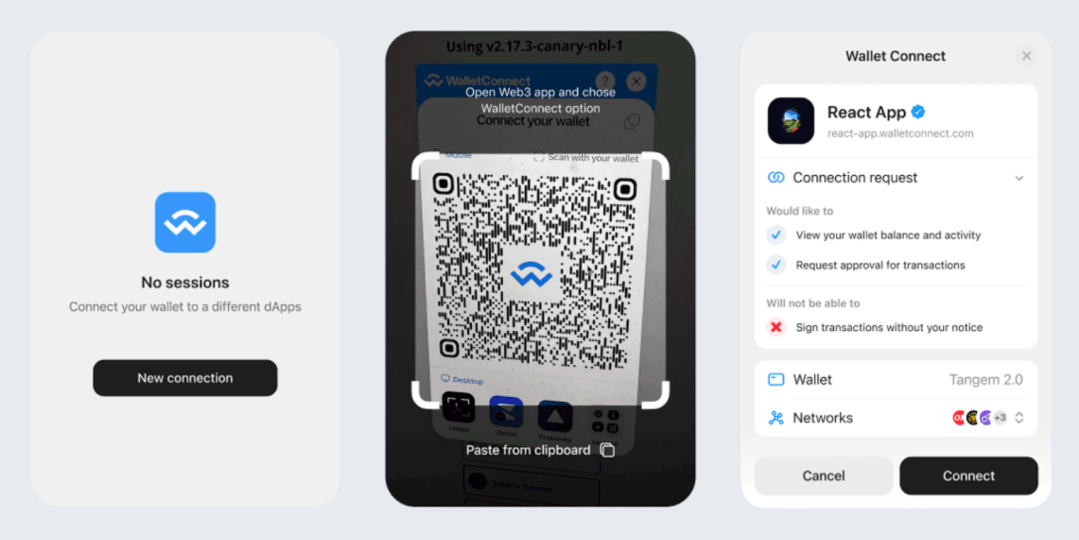
If diving into DeFi staking, lending, or NFT trading feels daunting due to fragmented decentralized applications (dApps) and security concerns, Tangem’s latest app update version 5.27 provides a powerful solution. This release introduces a revamped WalletConnect user experience, boosting security and simplifying interaction with thousands of dApps across multiple blockchain networks, including Solana, Ethereum, and other EVM-compatible chains. Additionally, it expands token support for Stellar (XLM) and XRP Ledger (XRP) tokens, enhancing the versatility of Tangem wallets for everyday crypto management.
Improved WalletConnect Interface for Seamless dApp Access

WalletConnect is a protocol that connects dApps with crypto wallets through QR code scanning or deep linking, keeping private keys securely on hardware devices like Tangem cards or rings. The v5.27 update delivers significant UI improvements and integrates a scam detection tool powered by Blockaid, which vets dApps in real-time to reduce the risk of interacting with malicious sites or contracts.
Key enhancements include transaction simulation, which preview transactions off-chain to reveal potential errors or malicious code before signing. This feature also addresses blind signing vulnerabilities by showing human-readable previews of the transaction’s effects. Furthermore, Tangem employs a transaction verification (VTX) method where a trusted verification provider cryptographically signs a detailed transaction report, ensuring the on-chain transaction matches the off-chain preview exactly.
Know Your dApps (KYDA) is another security layer that cross-checks dApp URLs and smart contracts against an updated blacklist, issuing warnings or blocking connections to suspicious platforms. These checks, managed seamlessly in under a second, foster safer Web3 interactions within the Tangem app.

Alongside these WalletConnect upgrades, Tangem Wallet now supports storing and transacting with tokens on the Stellar (XLM) network and XRP Ledger (XRP). This expansion brings even more flexibility in managing diverse assets directly within Tangem wallets.
How to Use WalletConnect on Tangem
- Update the Tangem app to version 5.27 or later.
- Add desired blockchain networks, such as Ethereum or Solana, in the app.
- On a dApp website, select Connect Wallet > WalletConnect.
- Open Tangem app’s WalletConnect scanner, scan the QR code, and approve the connection.
- Confirm transactions securely by tapping your Tangem card or ring.
Supported blockchains include Ethereum, BNB Smart Chain, Polygon, Avalanche, Solana, and more, while popular dApps like OpenSea, Uniswap, PancakeSwap, and Raydium are compatible.
Best Practices for Secure Use
To fully leverage the security improvements, users should always verify dApp domains, heed Tangem’s alerts, keep the app current, and carefully review transactions before approving. Avoiding suspicious or “too good to be true” offers and revoking unnecessary token permissions regularly also helps maintain wallet safety. Tangem encourages using these tools alongside vigilance for the safest DeFi and NFT experiences.

Tangem version 5.27 significantly advances the WalletConnect experience by pairing hardware-backed security with smart real-time dApp validations through Blockaid. The added XRP and XLM token capabilities further establish Tangem as a versatile, secure choice for managing crypto assets across leading blockchains. Users are empowered to explore decentralized finance and digital collectibles confidently, supported every step of the way by Tangem’s robust security and user-friendly design.
If you haven’t purchased your Tangem wallet yet, you can get it with a discount from my link here: https://bit.ly/shop-tangem
You can also download my eBook guide to all major crypto wallets – hot and cold, I talk about the differences between these, which ones I recommend from my personal experience and I go through all of the top hardware wallets there, so you can make the right choice which is the wallet for you. It’s a free eBook, just get it from this link.
☝These are my opinions, not financial advice, always DYOR.
 👉 👉 Sign Up for the Crypto Corner Newsletter and get more insight on the crypto markets, new releases and updates, plus my personal choice of coins to trade.
🚩OTHER TOP CRYPTO SERVICES: https://ojjordan.com/resources
💻Find me on:
🔹Twitter
🔹LinkedIn
🔹Clapper
🔹My Official Website: http://ojjordan.com

⚠️ DISCLAIMER ⚠️
The information contained in this video is for informational purposes only. Nothing herein shall be construed to be financial or legal advice. The content of this post reflects solely my own opinions. Purchasing cryptocurrencies poses considerable risk of losses.
Metamask Is Tracking Your IP and Wallet Address…
CRYPTO CORNER EPISODE 558 Market Analysis, Updates, News & Reviews In today’s episode I discuss the latest hot topics in crypto: ►Metamask Controversy – Is your Wallet Addy being Linked To Your IP Address? ►How To Earn Bitcoin using the Bitget Launchpool (4 days left only, hurry up) ►Win A Hardware Wallet Device from Keystone…

Steel Plates For Seed Phrase Protection | xSeed Plus Review
CRYPTO CORNER EPISODE 449 Market Analysis, Updates, News & Reviews In today’s episode I review my latest purchase – the metal back up for my seed/mnemonic phrases by SecuX. This is a complete kit containing: 3x Stainless steel plates1x Aluminium plates1x Metal letter stamps A to Z1x Engraving pen2x Fraudproof security stickers1x Plate Holder (leather…
My crypto wallet got hacked. All funds gone.
After being in crypto for the last 5 years, today I found out that I became a victim of a cyber attack. A wallet hack to be more precise. I haven’t used my Exodus wallet in many months, possibly more than 8 months actually, so I had a bit of a shock today, when I…

 Crypto-Corner