
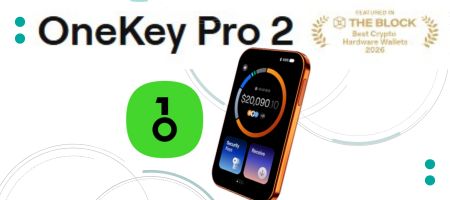
I’ve been testing out the new OneKey Pro 2 and today I’m going to give you my verdict on this brand new device. It’s just been released and I know you want to have the latest, most advanced wallet in your arsenal, so let’s see if this device fits the bill.
I can tell you right off the bat, this thing is unlike pretty much any hardware wallet I’ve reviewed on the channel. It’s packed with features, but the real question is whether all these extras actually make securing your crypto easier, or if it’s just feature bloat.
Design, Build & Display
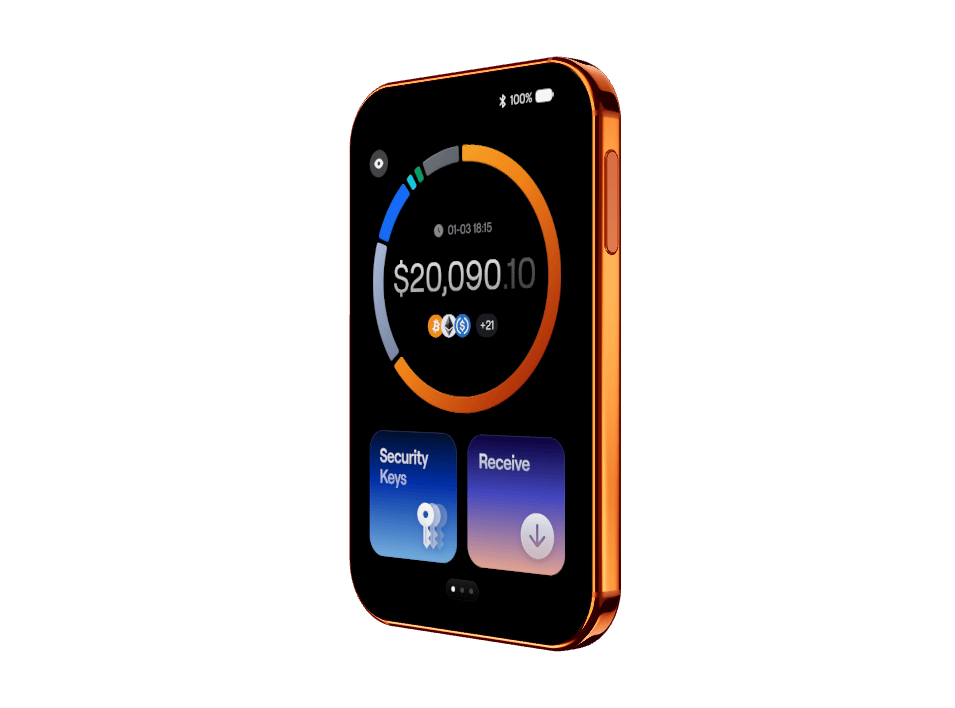
So, my first impressions? This doesn’t feel like a standard hardware wallet. It’s super thin, just 6.2 millimeters thick, which is almost 20% thinner than the original Pro model. Between the smooth aluminum frame, frosted glass back with a camera, and Gorilla Glass 5 on the front, it feels a lot like holding a mini smart phone. I like that it’s thinner as it can fit in a pocket inconspicuously and I really like that it has this magnetic case, just a sleek touch, not really important, but for someone who travels a lot, it’s a great addition – it means less risks of scratching the screen.
A few hardware highlights to know about this new model:
- Fingerprint Scanner: a feature that is becoming very popular for the past few years. It’s built right into the power button. It’s optional, and once set up, you can skip typing your PIN every single time. This is great for everyday use.
- Battery & Durability: it has a 700 mAh battery, supports wireless charging, and carries an IP56 rating for dust and water resistance. The battery percentage can drain visibly while you’re messing with the settings, but for standard day-to-day signing, it won’t be an issue. It’s designed to last for several years, which is what people care about. And let’s face it, I no longer expect any device to last for 30,40 years, at this point, it is quite obvious that we are bound to upgrade our hardware wallets every decade or so, and maybe even more frequently, so even when the battery can last longer, it’s not very likely that you would keep using the same device after that. The early Trezor and Ledger models are now 10 years old and none of them are being supported, or used anymore, right? So that goes to show you that a decade is pretty much the upper limit for your hardware device, even if it’s still operational. The tech moves quickly and upgrades are inevitable. This is just a side note.
- The Screen: It’s a full-color OLED screen running up to 800 nits, so it gets quite bright outdoors. Thanks to OneKey’s new Safe OS 2 running at 50 FPS, scrolling feels fast with practically no UI lag. The touch targets are large enough that you won’t have any problems typing.
One unique touch is – it actually displays your crypto portfolio balance directly on the wallet screen. It’s a static balance based on your last sync, so while it doesn’t update in real-time, it’s just a cool visual feature. It updates when you sync it with the mobile app, so the app updates via the internet, but the wallet balance will update via the app, it does not need to be connected to the internet.
Connectivity, Setup, & Ecosystem
When it comes to linking to your devices, you’ve got options:
- Bluetooth & USB: Works with both desktop and mobile, which is great considering some competitors don’t allow desktop Bluetooth connections. Firmware updates can be done over either connection but I’ve had some issues with other devices when using Bluetooth for firmware upgrades, so I prefer using the cable. The last thing you want is to have an incomplete upgrade and I certainly don’t want to take that risk, so I’m using the cable. I am okay with Bluetooth for transactions, just not for updates.
- Air-Gap Mode: this is where I find the biggest strength of this model. It offers a full Air-Gap mode. This kills all data transfer over Bluetooth and USB, forcing transactions to be signed strictly via QR codes using the camera on the back. If you’re familiar with this channel, you know I am a big fan of air-gapped wallets as they eliminate a lot of the online risks.
- Offline Generation: You can generate 12, 18, or 24-word seed phrases—plus SLIP39 multi-share backups and passphrases—completely offline without plugging into anything.
The accompanying OneKey app supports over 100 blockchains, meaning you can buy, sell, swap, bridge, and stake without constantly jumping between third-party apps.
Security
Of course this is most important part for any wallet and this is where the Pro 2 tries to separate itself from every other cold wallet out there.
Core Security: Open-source code (both the software and firmware), which is great – it means anyone can independently verify the security and that’s something that all wallets should do. Trezor is open source and in fact, the first Onekey was built with the source code of Trezor, adding improvements and upgrades. This new model also has four EAL 6+ secure element chips, bootup firmware verification, and user-verifiable entropy. If you remember a few months ago we had the Coldcard hack that became possible due to weak entropy while creating seed phrases and Onekey takes this issue seriously and gives us a chance to verify the true randomness of seed creation. And there’s even a mechanism to detect unauthorised firmware when it boots up, and all these are excellent advanced security features in my view.
Hardware secirity is only half the story, we should also consider the software.
OneKey breaks its software security down into three stages:
- Before Connecting (Sight Scan): It checks dApps and websites for known phishing risks or malicious contracts before your wallet even connects.
- Before Signing (Clear Signing & SignGuard): Clear signing translates complex contract code into plain English so you can actually read the amounts, tokens, and permissions. SignGuard takes it a step further by actively flagging suspicious behavior, like unlimited token approvals or unverified contracts.
- After Signing (Post-Transaction Monitoring): Even after a trade is complete, the app continues monitoring your active permissions and alerts you later if a previously approved contract starts looking sketchy or gets compromised.
It’s essentially like having a security analyst sitting next to you. However, you still need to pay attention to what you approve, you cannot rely entirely on these tools, you shouldn’t be complacent with your trades and transactions.
And there are some extra security features too:
- SeedCard: Included in the box, this is a PIN-protected smart card that stores an encrypted offline backup of your seed phrase. OneKey already has this product as a standalone device for older models, but here it is included in the box, which I really like. It’s this smaller, square card and you just tap it to the back of the wallet to restore. This is ideal for a quick recovery of the wallet in case you have to wipe it out. For instance, if you forget your pin and after several failed attempts the device will get wiped out. You then do a recovery with this card and setup a new pin. You have everything resorted easily and without having to enter your seed manually.
- Find My Network: which integrates with Apple’s Find My app so you can locate the wallet if you lose it.
- Passkey / FIDO2 Support: Doubles as a physical security key for your Google, exchange, or social media accounts. Now, this is a feature I don’t really use, frankly, I don’t think I want to use my wallet as a FIDO2 key, but maybe some users prefer that, so the feature is there for you, if you want it.
Value for Money
The OneKey Pro 2 retails for $299. Out of the box, you get the wallet, the magnetic protective case, the SeedCard backup, and a free 6-month trial to their security service, OneKey Prime. So, some of these security features I mentioned (Sight Scan, SignGuard, and post-transaction monitoring) are actually on a subscription basis. Not ideal, but of course, real-time monitoring takes up resources, so it makes sense that it will be charged for. But you have 6 months to test these features and should you decide you don’t need them, you’re not obligated to pay and use them.
After your 6-month free trial ends, Prime costs $179 for every six months if you choose to subscribe.
In fact, most other wallets don’t actually offer these solutions at all. Prime is a good option for traders and anyone active in defi though. You can trade perpetuals directly from your wallet, so for an active trader these are great, but you can do without them if you plan to simply store your crypto with this device.
If you choose not to renew, the wallet still works perfectly fine for all standard cold storage, offline signing, and ecosystem management, you just lose the automated active risk scanning.
But for $299 you get a pretty good package – the magnetic protective case, the auto-backup card, usb C to usb C connecting cable, and all the advanced security features of the device itself – combined with the in-app features like token swaps and pro trading using hyperliquid’s dex – it’s all you need to truly maintain self-custody and true ownership of your assets. So, for the price, I think this is a steal. It certainly surpasses all of the competition as of right now.
So, do all these features make securing your crypto easier? Honestly, yes.
Especially considering its Air-Gap capabilities and built-in transaction analysis. It bridges the gap between complex power-user features and beginner-friendly User Interface and overall experience.
You can also check out my free guide on all major crypto wallets – hot and cold, I talk about the differences between these, which ones I recommend from my personal experience and I go through all of the top hardware wallets there, so you can make the right choice which is the wallet for you. It’s a free eBook you can access with this link.
Stay informed and level up your crypto strategy
👉Go to LearnCryptoNow.com for free guides, tutorials and all things crypto

Disclaimer: This article is for informational purposes only and does not constitute financial advice. The content of this post reflects solely my own opinions. Purchasing cryptocurrencies poses considerable risk of losses.
Metamask Is Tracking Your IP and Wallet Address…
CRYPTO CORNER EPISODE 558 Market Analysis, Updates, News & Reviews In today’s episode I discuss the latest hot topics in crypto: ►Metamask Controversy – Is your Wallet Addy being Linked To Your IP Address? ►How To Earn Bitcoin using the Bitget Launchpool (4 days left only, hurry up) ►Win A Hardware Wallet Device from Keystone…

Steel Plates For Seed Phrase Protection | xSeed Plus Review
CRYPTO CORNER EPISODE 449 Market Analysis, Updates, News & Reviews In today’s episode I review my latest purchase – the metal back up for my seed/mnemonic phrases by SecuX. This is a complete kit containing: 3x Stainless steel plates1x Aluminium plates1x Metal letter stamps A to Z1x Engraving pen2x Fraudproof security stickers1x Plate Holder (leather…
My crypto wallet got hacked. All funds gone.
After being in crypto for the last 5 years, today I found out that I became a victim of a cyber attack. A wallet hack to be more precise. I haven’t used my Exodus wallet in many months, possibly more than 8 months actually, so I had a bit of a shock today, when I…


