

Secure storage is of utmost importance as digital assets are vulnerable to hacking and theft. With the increasing popularity of cryptocurrencies, the need for secure storage solutions has become more critical than ever. This is why I feature here, all the best crypto services and storage solutions, and I have reviewed every single hardware wallet that is worth your money. It’s hard to pick favourites, but Keystone is surely in my top 5.
I was using the older Keystone Pro until I got the new, Keystone 3 Pro, and like its predecessor, it’s designed to provide a high level of security, great functionality and a smooth and easy user experience. Take a look at my video below for my detailed review or scroll down to keep reading.
I also have a special 15% discount coupon, should you choose to buy this device: “CRYPTOCORNER” which you will apply at checkout on their official website: https://keyst.one/shop
You know, everything digital is vulnerable to hacking and theft. Most people still hold their crypto in hot wallets and exchanges, and this is really not safe guys. Unlike traditional bank accounts, cryptocurrencies are not insured by the government, and once they are stolen, they cannot be recovered. Therefore, it is essential to store digital assets offline, cold storage, which is a much more secure way, to prevent unauthorised access and theft. Hardware wallets like the Keystone here provide an extra layer of security by storing your private keys offline, making it virtually impossible for hackers to steal your digital assets. So, let’s start with the security first.
Security
Like its predecessor, the legacy Keystone device, this new model offers air-gapped technology: this means it can work completely disconnected from the internet ensuring complete network isolation. It’s worth mentioning that there is a USB connectivity, should you choose to use that, but for experienced users, it’s best to avoid it. It’s good to have the choice, of course, but in my case, I prefer it being air-gapped, so I’m using it with QR codes and not with the USB cable. The cable is good for charging the battery, which is internal in contrast to the previous models, where the battery was external.
Secure Element: The Keystone 3 Pro uses 3 bank-grade secure chips to generate true random numbers, derive private and public keys, sign transactions, and protect private keys from being leaked if an attacker has physical access to the device. This ensures that private keys never leave the device and are stored with the best possible protection from physical attacks. In fact, this new model is the first device I’ve seen that has 3 secure elements.
Compared to its biggest competition: Ledger and Trezor, it is in fact, way more advanced.

Anti-tamper self-destruct mechanism
Keystone 3 Pro incorporates a PCI-grade anti-tampering feature, with an intricate ‘security house’ of circuitry encompassing the core IC and SE chips. Any physical tampering results in an immediate data wipe-out, further strengthening the device’s resilience. This is the so-called “self-destruct mechanism” that this brand pioneered a few years back and continues to be a core feature in their ‘Pro’ series.
Now, the question that I usually get when I mention this is: “Does this mean I will lose my assets, if the device self-destructs I’ll lose access, right?”
Not really.
I have to point out that your assets are not stored on the device itself, so you can simply migrate to a new device, it doesn’t even have to be the same brand, it could be any. All you need is your seed phrase – make sure you don’t lose that. You will need it to sync any device with your data and access all the crypto you had on that previous device. These hardware wallets have one main purpose: to store your private keys safely. This is what you need to access your coins and tokens. Regardless of which blockchain they belong to: Bitcoin or Ethereum or Polygon, Ripple… every blockchain is accessed via a private key and this is what is stored in here. The way to migrate to any other device or a new model is by importing your seed phrase that you will generate the first time you setup your device. Which is what I did here with this one, migrating from my older Keystone device.
Most wallets use a standard for seed phrase generating called BIP39, meaning, they all have compatibility, regardless if the seed is 12 or 24 words or 18, there are different setups, but in general, cold wallets use the same standard, so they are interchangeable. This is why I always remind you that your seed phrase is the most important thing and I use metal plates to store and safeguard my seed phrases. Keystone also offers this product – three different models, so it’s a good idea to order one of these with your device. You can use my discount code ‘CRYPTOCORNER’ for that too (apply at checkout).
Another security feature that I need to mention, and most wallets have that, is PIN protection. You enter a pin when you power up the device. It’s the first line of defence against unauthorised users.
Design and UI
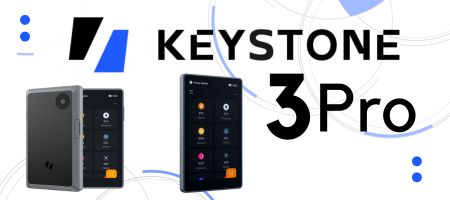
In terms of design, it’s very similar to the original model, slightly more sleek. The screen is a large, 4″ touchscreen that makes it easy to navigate and use, which I like. It means the device is bigger than some other wallets on the market, but this is the point here. I already have several small devices and let me tell you – it is too easy to lose them – or rather, misplace them, which is bad enough. I’ve spent DAYS looking for my Ledger. Trezor too. And not just once, it’s happened to me many times over the last 5 years, so I like to have a device that fits perfectly in my hand and is easier to find if I’m in a hurry. This is ideal for a more frequent usage. Having a large screen makes it more user-friendly than any of the smaller devices, so it’s a plus for me.
The Keystone 3 Pro has a metal casing that provides extra durability and anti-tamper features. There is a fingerprint sensor to unlock the device and for signing transactions, so if you are in public, you don’t have to risk exposing your pin or password.
The Pro version also stands out with its unique biometric capabilities, which are not available in the standard Keystone 3 model. The device has one button (to power on/off), front screen, a camera on the rear (used for scanning QR codes) and the fingerprint sensor also on the rear side.
The setup process is intuitive and user-friendly especially on that large screen, making it suitable for beginners. I posted a short video tutorial of the setting up which you can find here.
Get 15% discount for any Keystone product! Use coupon “CRYPTOCORNER” and apply at checkout on their official website: https://keyst.one/shop
Functionality and Compatibility
Keystone supports over 5000 cryptocurrencies and transaction decoding. It is built with web3 in mind and it’s easier to sign DeFi transactions here than it is on Ledger, for instance. The team is still in the process of adding support to this new model for all the blockchains that the previous models have, as of right now the supported chains are BTC and ETH by default and Cosmos has just been added. Solana, Tron, Cardano, Aptos, and Sui will be added in the coming month.
USB Upgrades or Airgap
USB upgrades is considered a new feature that is optional and Air Gap mode is the other option for those who prefer it (like myself).
In the old model, firmware upgrade was done with the help of a micro SD card. You download the upgrade to the card, insert the card in the device and extract the upgrade. If you’re into SD card upgrades, your wallet stays air gapped. But for newbies who like the convenience of USB, this new model allows that after an initial firmware upgrade via SD card before switching to USB upgrades. I do not use the USB because I like it being air-gapped.
Operability
Another new feature is that you don’t use a native app to navigate with this device, but instead, you will connect it to a third party, like Metamask, Rabby, Safe or other. Up until this point, we used a native, Keystone mobile phone app to navigate the device but the team is trying to make things as decentralised as possible, so that users have total self-custody with this device. I was a bit taken aback by this, especially since I don’t trust Metamask too much, so I reached out to their team to ask why this change. Here is what they explained to me:
“We decided to leave the Keystone Companion App mainly because we wanted to avoid the single point of failure. We wanted to give users more independence and trust in their own control and it frees up our time to focus on hardware developments. In our opinion, Rabby wallet is a great choice since the team really cares about users’ security and privacy. Safe is also a solid choice for multi-signature transactions.”
This makes sense to me, and Safe Wallet has a mobile application and you can use it for the older model, the legacy Keystone Pro – you can read more about this here, on this blog post, check it out, I’ll drop the link in the description below..
Backup and Recovery
In regards to back up and recovery, there are several options, including mnemonic phrases and Shamir backups.
The seed phrase this wallet generates is 12 or 24 words (you have a choice), which I like. I am not too keen on a 12-words mnemonic phrase, so 24 is my preference.
On top of that, you can manage up to 3 unique seed phrases from a single device, which is great. I didn’t find this feature in any of the other wallets I use.
The Shamir backup allows you to split your backup seed in such a way that it allows you to specify how many Backups you need to restore your wallet. The smallest is 2 out of 2 or a maximum 16 out of 16 Shamir Backups. For instance, if you have a “3 out of 5” pieces of Shamir Backup and you lose 2 of those, you can still restore, with the remaining 3 backups.
Recovery, or restore, is a feature that you will use only if you’re migrating from another wallet or on the rare occasion that you upgrade the firmware and it causes a reset of the device, which doesn’t really happen, but it is possible. In such cases, you will need to import your seed phrase during the setting up process. Just remember – this is a self-custodial wallet, meaning, nobody can do the restore without your seed phrase. Not even the developers – they have no exposure to your seed phrase, so they can’t help you – make sure you never lose that. Punch it onto a steel or titanium plate. You can check out this post I dedicated to the various metal plates I use.
Battery Life and Standby Time
The Keystone 3 Pro has a built-in battery that lasts 10 times longer than the previous models. Charging time is around 3 hours and the standby time at full charge is over 200 hours. Many other wallets do not use a battery at all. They have to be powered with the usb cable, which is a point of failure. Here, you don’t need to use the USB cable to connect to your computer or phone, just to charge the battery. Approving transactions happens with QR codes, so no need to use the cable to connect to my computer.
Pricing
The Keystone 3 Pro hardware wallet is priced at $169 making it a good value for money compared to the market leaders Ledger and Trezor, which are its biggest competition. Don’t forget, you get a 15% discount with coupon “CRYPTOCORNER”, so use it.
Pros and Cons
So, let’s see what are the Pros and Cons, what do I like and what I think could be improved.
PROs
- It’s a light, well-designed piece of tech that fits well in my hand.
- Large touch-screen display
- Fingerprint authentication
- Airgapped
- 3 Secure Element chips
- Self-destruct mechanism
- Support for a large number of cryptocurrencies
- Value for money
- Integrated with several popular software like Metamask, Rabby, Safe, Solflare, Sender, and more.
CONs
- Well, the biggest let-down for me is the battery being internal. What I really liked in the older model is that I could use it with AAA batteries if I ran out of battery, or when the original battery is no longer usable. But now that there’s a USB cable, this will be used for powering up in case your battery is running flat, so I guess not a big deal.
- I think the move away from having its own App for navigating the device could be a drawback too. It’s funny, because on the one hand, you now have a choice of various other platforms to use for navigating, but on the other hand, I like to use one official App, by the same developers as the device, so things can be custom-made. It kind of gives me more peace of mind.
Other than that, I don’t have much to critique. It’s surely a step up in terms of design and security, so what’s not to like? There’s also a Bitcoin-only version for those maxis out there, so that is ideal for me too, because I use quite a few wallets already, so some of these are only for my long term Bitcoin holdings.
Take a look at their blog by the way, it’s packed with important articles on everything you need to make the most out of your Keystone – they post every week, so it’s very informative and useful.
All in all, this is a really solid, secure and long-lasting device and I particularly like the fact that it’s air-gapped. Using QR codes, you can verify each and every data transmission to ensure that information coming into the Keystone Hardware Wallet contains no trojans nor viruses and information going out doesn’t leak private keys or any other sensitive information. In contrast to USB or Bluetooth, QR codes are entirely verifiable as any normal QR code scanner can convert their data contents into human-readable format.
All of these factors make the Keystone 3Pro one of the best cold wallets currently on the market.
Get 15% discount for any Keystone product! Use coupon “CRYPTOCORNER” and apply at checkout on their official website: https://keyst.one/shop
You can also download my eBook guide to all major crypto wallets – hot and cold, I talk about the differences between these, which ones I recommend from my personal experience and I go through all of the top hardware wallets there, so you can make the right choice which is the wallet for you. It’s a free eBook, just get it from this link.
☝These are my opinions, not financial advice, always DYOR.
 👉 👉 Sign Up for the Crypto Corner Newsletter and get more insight on the crypto markets, new releases and updates, plus my personal choice of coins to trade.
🚩OTHER TOP CRYPTO SERVICES: https://ojjordan.com/resources
💻Find me on:
🔹Twitter
🔹LinkedIn
🔹Clapper
🔹My Official Website: http://ojjordan.com

⚠️ DISCLAIMER ⚠️
The information contained in this video is for informational purposes only. Nothing herein shall be construed to be financial or legal advice. The content of this post reflects solely my own opinions. Purchasing cryptocurrencies poses considerable risk of losses.
Metamask Is Tracking Your IP and Wallet Address…
CRYPTO CORNER EPISODE 558 Market Analysis, Updates, News & Reviews In today’s episode I discuss the latest hot topics in crypto: ►Metamask Controversy – Is your Wallet Addy being Linked To Your IP Address? ►How To Earn Bitcoin using the Bitget Launchpool (4 days left only, hurry up) ►Win A Hardware Wallet Device from Keystone…

Steel Plates For Seed Phrase Protection | xSeed Plus Review
CRYPTO CORNER EPISODE 449 Market Analysis, Updates, News & Reviews In today’s episode I review my latest purchase – the metal back up for my seed/mnemonic phrases by SecuX. This is a complete kit containing: 3x Stainless steel plates1x Aluminium plates1x Metal letter stamps A to Z1x Engraving pen2x Fraudproof security stickers1x Plate Holder (leather…
My crypto wallet got hacked. All funds gone.
After being in crypto for the last 5 years, today I found out that I became a victim of a cyber attack. A wallet hack to be more precise. I haven’t used my Exodus wallet in many months, possibly more than 8 months actually, so I had a bit of a shock today, when I…

 Crypto-Corner
4 thoughts on “Crypto Cold Wallet: KEYSTONE 3 PRO Review”